 WebHostDesignPost
One of the easiest ways to advertise is putting up some banner ads. But what are the best sizes for your website? There are a couple of things to be aware of when designing your advertising banners.
Visitors are prone to ignore standard banner sizes. There is an art in itself to make an attractive informational banner ad. Colors, typography, and sizes all play a part into how your visitor will react.
Standard Banner Sizes
You don't thave to make a banner a certain size. But there are some sizes that are considered the most common or best practice. These are sizes that are supported in all major PPC or retargeting campaigns.
Most Common
- Medium Rectangle - 300 x 250
- Large Rectangle - 336 x 280
- eaderboard - 728 x 90
- Half Page - 300x 600
- Large Mobile Banner - 320 x 100
Other Popular Sizes
- Mobile Leaderboard - 320 x 50
- Banner - 468 x 60
- Half Banner - 234 x 60
- Skyscraper - 120 x 600
- Vertical Banner - 120 x 240
- Wide Skyscraper - 160 x 600
- Portrait - 300 x 1050
- Large Leaderboard - 970 x 415
- Billboard - 970 x 250
- Square - 250 x 250
- Small Square - 200 x 200
- Small Rectangle - 180 x 150
- Button - 125 x 125
As you may of noticed is that banner sizes have been getting larger in resolution pixels. As computer monitors and mobile devices follow the same trend.
Target Audience
Target Audience is important. When you narrow down your target audience on your site banner, you will have a higher conversion rate. Create banners that supports your theme and what your visitor are interested in.
Making banners that have nothing to do with your site, make no sense, and are a waste of time.
Ad Placement
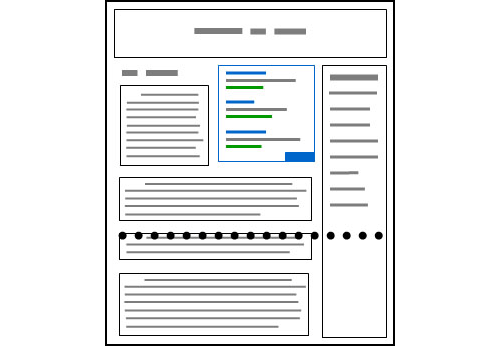
Location can play a big role in your interaction. Marketers have noticed that putting a banner on the top of the page is one of the best places to begin.
You have probably noticed all the different areas other webmasters put banners. Such as in the middle of the article, left or right of the body, or even at the bottom.
Keep in mind the top right of your page is a great place. As it is above the fold and people tend to look across your page. This gives you the most optical placement.
There are placements on your page that could negativly hurt your ROI. Splitting your content with an ad or any type of popup. Typgically brings in a lower conversion than other methods.
When changing a banner placement, record and watch new results to see if it was a winning decision.
Visual Animation
Animation can help your banner be an eye catcher. Animation can focus your visitor's attention. Moving graphics, changing colors, or a video gif are popular ways to draw attention.
Try to stay modern with what others are doing. You don't want to have a flashing "You Win" banner, as people have labeled them as SPAM.
Great Banner Headlines
Make a statement with your banner. There have been more success stories from marketers that swear by headlines. Having a powerful statement or solving a problem tend to brings more traffic.
Use on any type of holidays or use the typical "buying" keywords for easy converting headlines.
Top 21 Buyer Keywords For Headlines
- Best
- Bargain
- Biggest
- Bonus
- Buy
- Cheap
- Clearance
- Closeout
- Coupon
- Deals
- Discount
- Easy
- Fast
- Free
- Free Shipping
- Low Price
- New
- Offer
- Save
- Sale
- Top
New & Fresh Banners
Having new and fresh banners is your best tool. People will click on your banners, there’s no denying that. But your regular visitors will get bored with the same banner.
When your regular visitors get board of your banner, that mean no more clicks. Try to change the frequently. Even if you are running the same promotion, change it to look different. This will draw your visitor's attention back.
Always Measure Results
Your standard banner ads can be done right. Visitors don't have a problem with banners that will help them find relative information.
If you do bad banners you are going to lose them. Having a couple of bad banners can make your good ones untrustworthy.
Because of this, always measure your result. Without tracking the, you wont have an idea which banner is good or bad. It may supprise you what brings in the most value with your target audience.

 Newsletter Signup
 Popular Articles
 Recently Updated Articles
What Do You Think?