 WebHostDesignPost
There was a time that Flash was the leading the way in technology. But as time moves on, more and more websites and mobile apps are moving away from using Flash. A better way to do movies, audio, and other interaction media is to use jQuery or HTML5.
Flash has become very common in web development and it isn't going away anytime soon. Will Flash take over the other web languages? Will Flash be the only web application in the future? Nobody knows the answers to these questions but it is safe to say, NO.
There are many things that you need from a coding language that Flash does not provide. There are some applications that Flash hasn't grabbed a hold of. All of the big, successful websites are coded in other languages and then use Flash embed interaction, advertising, and applications.
What Is Flash?
Flash is an application created by Macromedia and now belongs to Adobe. Adobe purchased Flash in 2005. Adobe Flash is a vector base application made for drawing and creating animation.
In the last couple of years, developers have taken Flash to a new level. Making animation navigation, vector based games, and impress visitors with its design capabilities. Flash is now on version CS5, which has new features and is more compatible with other Adobe Software.
Flash Is A Tool for Web Development
For those you like doing animations and have full website design capability, use some Flash. There are many opportunities for your Flash layout. But there are some things you should keep in mind when creating your website. Remember even that you are using Flash, you still have a website. Your visitors might react differently at their first impression of your site.
Most sites are still not 100% made with Flash. Most sites use Flash for banner ads and some interaction techniques. Remember that Flash requires a third party plug-in from Adobe to display the content. This plug-in isn't something new, most of your users will have it.
Elements of Web Design
In some cases, developers have made full sites with Flash. With cool designs and interesting animation. One problem that you will face is that each time your content is changed, you have to re-render your site. There are ways around this. You can call your content from an external XML file, making it just as easy to update as static site.
The hardest thing in web design is keeping it simple. Website usability is your number one priority. You user might be impressed with the cool animations and sound effects. But if they are looking for information and content, and they can't find it. They are going to leave and probably not come back.
Flash Checklist
Here are a couple of things to double check when creating your Flash website.
Simplicity
I know I keep repeating myself, but simplicity is really important. Making your website incredibly easy to navigate and function puts you light years ahead of others. Visitors are looking for content and information, so give it to them. Don't make then search on your webpage for a long time. Make it easy to find what they're looking for and they will come back for more.
Intro Movies

This is common for Flash websites. No sure not sure why, but don't do it. They are a waste of time. You spend more hours making them, then people watching them. Most of your visitors are going to skip it and get annoyed. If you are going to do an intro movie, then make it short and not more than 10 seconds.
Multiple Browsers
Test your Flash site in different browsers and as well in different operating systems. Flash reacts and displays differently to cross browsers and operating systems. Internet Explore likes to put a border around Flash objects, where Firefox doesn't. Flash also requires the users to have a plugin installed. Do some extra coding to notify the user that doesn't have the plugin. Then help them install it so they can view your website properly.
Optimize Your Images
Flash movies and/or applications can be large in size. Make sure you are doing proper optimization to your images and movies. Your visitors are impatient, they don't have all night. If your video takes more than 5 seconds to buffer, they might just bailout.
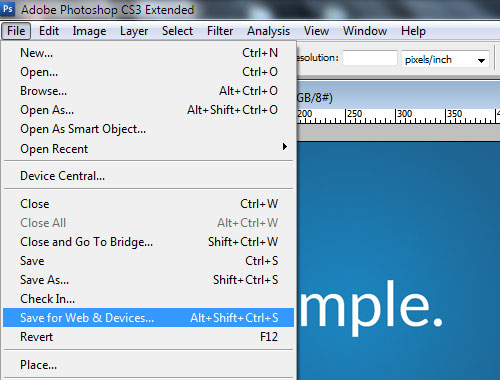
Adobe Photoshop has some optimizing techniques for your images by using the "Save for Web" option. Photo images are best viewed in .jpg and vector based images are best viewed in .gif. If you need to work with transparency, .gif will do it, but .png is better. If you have video, try converting it to a .swf file, that is native to play in the Flash player.
Pre-Loaders

There is good things about pre-Loaders and bad things. It is a good idea to have a pre-loader if your website is large. Giving your visitors a queue that it could take some time gives them the decision to stay or leave. A bad idea is having a pre-loader on all elements of your website. If your website needs a pre-loader for your navigation, header, body and footer, you should re-think how you're doing things.
Keep Clear of Common Mistakes
These are some of the most common mistakes that are in flash layouts. Some web developers might agree with them, some might not. Either way, if you steer away from these mistakes your website will look better, have better usability, and your visitors will love it. There are always ways around mistakes, just think about the situation before making your decision. A recommendation for new Flash users is to learn some of the basic actions before creating a full site.

 Newsletter Signup
 Popular Articles
 Recently Updated Articles
What Do You Think?