 WebHostDesignPost
Cascading Style Sheets (CSS) is a coding language that works with HTML. You can use it internally or external and it controls the look, feel, and layout of your web design.
CSS is W3C compliant code and can help make your website more accessible to individuals with disabilities. It has become the number one choice the only choice for frontend develompent.
The Power of CSS
CSS can control your entire layout of your website. Headings, paragraphs, links, and whitespace can all be adjusted with edits to one file.
The best feature with CSS is the ability to layout an infinite number of HTML elements with one command.
CSS Examples:
You want all your paragraphs on your pages to have Arial, 1.3em and font color blue.
Lorem Ipsum is simply dummy text of the printing and typesetting industry. Lorem Ipsum has been the industry's standard dummy text ever since the 1500s, when an unknown printer took a galley of type and scrambled it to make a type specimen book.
In CSS you type in a couple of lines of code and that is it! If you want to make changes down the road. Alter that same line and everything will change.
Lorem Ipsum is simply dummy text of the printing and typesetting industry. Lorem Ipsum has been the industry's standard dummy text ever since the 1500s, when an unknown printer took a galley of type and scrambled it to make a type specimen book.
CSS I A Better Choice Than Tables
There was a time when developers used table HTML elements to control their layout. This is no longer an option you must use CSS in today's industry.
For a long time, sites didn't use CSS and coded their layout with table elements in HTML. Things have changed and CSS is now the universal standard.
You may have a hard time learning CSS and how it all fits together. But as soon as everything clicks, you will wonder why you didn't use it before.
Advantages Of CSS
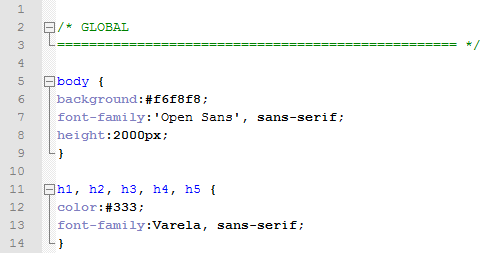
If you are planning a long journey of development you must learn CSS. There isn’t any way around it. Your pages will be clean, universal, and will require less maintenance time. You can universally change all aspects to any of the HTML elements.
You can store your code in an external sheet which will increase your page's loading time. And you can design to the exact pixel location of your site's design.
Learning CSS

Learning a new coding language can be overwhelming. Honestly, CSS is easy to understand and follow. There are a couple of ways to learn.
You can Google or YouTube some CSS Tutorials. You can go to Amazon and find some web development books. Or take an online or campus course on the subject.
I would recommend finding some tutorials online. There are thousands of sources and great sites to help you. If you are still having problems, then try to take a class.
CSS Tutorial Sites to Help You Along The Way
Here are some sites that have beginner tutorials on CSS. These sites also have tutorials that will build with CSS. Such as HTML, JavaScript and jQuery.

 Newsletter Signup
 Popular Articles
 Recently Updated Articles
What Do You Think?